
Jan111 Login and Registration Guide
Creating a Jan111 account takes a Pakistani phone number, a password and an image captcha — or one tap through Google. Here is each route, what it costs you later, and every reason a Jan111 sign-in gets rejected with what fixes it.
Affiliate link — we may be paid if you register through it · 18+ only · Play responsibly
Contents — 9 sections
How do you create a Jan111 account?
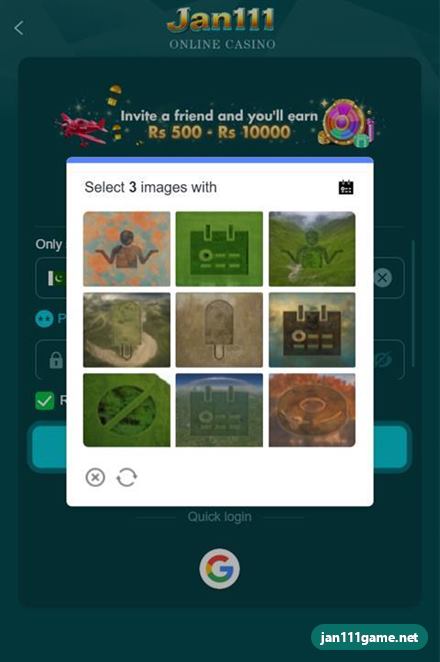
Choose Register rather than Login, enter your +92 number without the leading zero, set a password you use nowhere else, and complete the image captcha.
- Open the app or the site and select Register, not Login.
- Leave the dial code on +92 and enter your number without the leading zero.
- Set a password you use on no other service. This account will hold money.
- Complete the image captcha. It is there to block bulk account creation, not because anything is wrong.
- Register, then open the home screen.
- Claim the Rs 666 app reward from the bar at the top.
- Bind a second contact method before you deposit, so losing a SIM does not lose the account.
Registration asks for very little. No identity document, no address, no card. That makes signing up fast, and it also means the credential you choose on day one is the only thing connecting you to the account months later if a payout is ever queried.
If someone sent you an invite link, open the app through that link before registering. Referral attribution is set at the moment the account is created and generally cannot be added afterwards. If the invite reward is part of why you are signing up, this is the only step where it can be got right — see the invite code guide.
Should you register by phone or with Google?
Phone plus a password is the least fragile combination, because the number is what a support desk can work with and the password means you are not dependent on SMS at the moment you want to withdraw.
| Route | Good for | Worth knowing |
|---|---|---|
| +92 phone number | The default, and what support recognises | Tied to a SIM. Change networks and you should change the account first. |
| Google quick login | Speed, and surviving a SIM change | Keep that Google account reachable — recovery runs through it. |
| Password | Signing in without waiting for an SMS | Must be unique to this account. A wallet balance is a target. |
Why bind a second method before depositing?
Because an account reachable only through an SMS code on a SIM you no longer own is an account you have effectively lost — and that is a more common way to lose a balance than any scam.
Do it while the balance is zero and it is a settings change. Do it afterwards and it becomes a support request requiring proof of ownership, which is considerably harder. The deposit guide covers what else to do before funding.
How do you sign in to Jan111?
Select the Login tab, enter the same identifier you registered with, then your password or a requested code.
- Open the app and select Login rather than Register.
- Enter the same identifier you registered with — the number or the Google account, not whichever is convenient today.
- Enter your password, or use Google quick login if that is how the account was made.
- Tap Login. If a code was sent, wait the full retry window before requesting another.
Why is my Jan111 login not working?
Almost always the identifier, not a ban. A leading zero after +92, or signing in by phone to an account created with Google, accounts for most failures.
| Symptom | Likely cause | What to do |
|---|---|---|
| Account not found | Registered with Google, signing in by phone | Use the route the account was created with |
| Number not recognised | Leading zero kept after +92 | Enter +92 3XX…, not +92 03XX… |
| Code never arrives | SMS filtering or weak signal | Wait the full window, check blocked messages, then use the other route |
| Password rejected | Password belongs to a different account | Use recovery rather than guessing — repeated failures can lock the account |
| Captcha keeps failing | Ambiguous characters | Refresh the image instead of retyping the same reading |
| App closes at login | Outdated build | Reinstall the current package, or use the browser |
| Works in browser, not app | Stale app cache | Clear the app cache or reinstall |
| Account suspended | Multiple accounts on one device or number | Contact support — do not create a second account |
If the app refuses your credentials, try the browser version before assuming the account is at fault. That single test separates a stale app build from a real credential problem.
Do you need the app, or will a browser do?
A browser will do, and it is the safer route. The same account works in mobile Safari or Chrome with no install permission and no package to tamper with.
If you do install, the rule that matters is where you get the file. A repackaged build from a forum or file-sharing mirror looks identical and can read everything you type into it, your password included. There is no way to tell by eye and no antivirus check that reliably catches it. Never install a “mod”, “hack” or “unlimited” build — there is no such thing as a modified build that wins more, only modified builds that steal credentials.
Jan111 publishes no APK size, version number or minimum Android version, so this page quotes none. Android itself refuses the install if the device is unsupported.
How do you keep a Jan111 account secure?
A unique password, a bound second method, the official download only, and never giving your password to anyone who asks for it.
- A password used nowhere else. Reused passwords are how accounts with balances get taken.
- Bind a second method so a lost SIM is not a lost balance.
- Never install a modified build. A repackaged app reads what you type into it.
- Nobody legitimate will ever ask for your password. Not support, not an agent, not a channel admin.
- Check the receiving account name before requesting a withdrawal, not after.
- One account per person. Duplicates are grounds to void bonuses and suspend balances.
- Never post your invite code or player ID publicly alongside other account details.
How do you contact Jan111 support?
The app directs support traffic to a WhatsApp Channel, which is a broadcast tool rather than a support desk. Use the in-app route for anything involving your balance.
A broadcast channel is one-to-many by design, so it will not resolve an account-specific problem such as a held withdrawal. Keep a record of what you sent and when. And whichever route you use: nobody legitimate will ever ask for your password.
Jan111 login FAQs
What do I need to register on Jan111?
A Pakistani phone number on the +92 dial code, a password, and the image captcha — or a Google account via quick login. No identity document is requested at sign-up.
Why does Jan111 say my account does not exist?
Almost always because the identifier does not match registration: a Google-created account being signed into by phone, or a number entered with a leading zero after +92.
I forgot my Jan111 password. What now?
Use the recovery route on the same number or Google account you registered with, then reset from inside the account. Avoid repeated wrong attempts, which can trigger a temporary lock.
Can I change the phone number on my Jan111 account?
That is a support request rather than a setting. Do it before you lose access to the old number, because proving ownership afterwards is considerably harder.
Can I have two Jan111 accounts?
No. Operators in this category enforce one account per person and treat duplicates as grounds to void bonuses and suspend balances. Creating a second account to claim the welcome rewards again is the usual way people lose a balance.
Is there a Jan111 login without the app?
Yes. The same credentials work in a mobile or desktop browser against the same account, with no install at all.
Is the Jan111 APK safe to install?
The official package carries the same risk as any sideloaded app — the risk is entirely in where you got it. A repackaged copy can read your password and is indistinguishable by eye. Use the official link, never a “mod” build.
What Android version does Jan111 need?
Not published by the app, so this page does not quote one. Android itself will refuse the install if your device is too old.
Ready to try Jan111?
Read the bonus terms before you deposit rather than after. Then start small and withdraw once, early, so you learn how payouts behave while very little is at stake.
Affiliate link — we may be paid if you register through it · 18+ only · Never stake money you cannot afford to lose